Unreal Engine · UI · MVVM · C++
Stop Your UI From Being a Paranoid Friend: Unreal Engine ViewModel Plugin
How to build event-driven UI in Unreal Engine with the UMG Viewmodel plugin: a C++ ViewModel for a spaceship HUD, FieldNotify setters and computed getters, and why we keep ViewModels in C++.
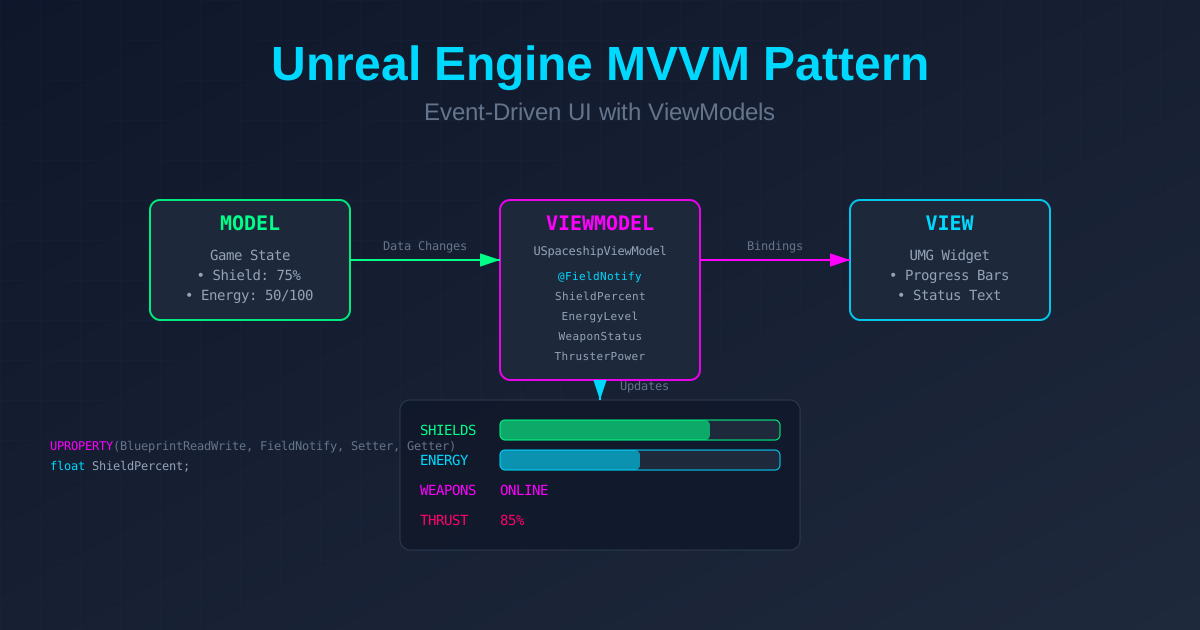
You know that friend who texts you every five minutes asking "Are we still on for tonight?" That's your UMG UI using the old binding system. It keeps polling your game state to check whether anything changed, burning CPU cycles like it's trying to mine cryptocurrency. Let's fix that with Unreal Engine's ViewModel plugin.
Why should you care about ViewModels?
Picture this: you're building a spaceship HUD. Shield levels, energy reserves, weapon status, thruster power, all updating in real time. With the traditional UMG binding system, your UI checks these values every single frame. That's like checking your fridge 60 times per second to see if new food magically appeared.
The ViewModel pattern flips this around. Instead of the UI constantly asking "Did anything change?", your game logic says "Hey UI, shields just dropped to 50%!" It's event-driven, there's no per-frame polling, and your CPU will thank you.
Setting up the ViewModel plugin
First things first, let's get this party started.
Step 1: Enable the plugin
Navigate to Edit > Plugins, search for "ViewModel", and enable the UMG Viewmodel plugin. It was still marked Beta in UE 5.x when this was written. We use it in GameplayFramework, our open-source Unreal plugin, without problems, but check its status in your engine version before you depend on it.
Pro tip: After enabling it, restart the editor. Trust me on this one.
Step 2: Configure project settings
Here's where we prevent confusion between the old and new systems:
- Go to Edit > Project Settings
- Navigate to Plugins > Widget Designer
- Find Property Binding Rule
- Set it to Prevent Binding
This stops the old polling-based binding system from appearing in your UI, keeping your binding menus clean and your sanity intact.
Step 3: Create your first ViewModel in C++
Now for the fun part. Let's build a ViewModel for our spaceship HUD:
// SpaceshipViewModel.h
#pragma once

#include "CoreMinimal.h"
#include "MVVMViewModelBase.h"
#include "SpaceshipViewModel.generated.h"

UCLASS(BlueprintType)
class MYGAME_API USpaceshipViewModel : public UMVVMViewModelBase
{
    GENERATED_BODY()

private:
    UPROPERTY(BlueprintReadWrite, FieldNotify, Setter, Getter, meta=(AllowPrivateAccess))
    float ShieldPercent = 100.0f;

    UPROPERTY(BlueprintReadWrite, FieldNotify, Setter, Getter, meta=(AllowPrivateAccess))
    int32 EnergyLevel = 100;

    UPROPERTY(BlueprintReadWrite, FieldNotify, Setter, Getter, meta=(AllowPrivateAccess))
    int32 MaxEnergy = 100;

    UPROPERTY(BlueprintReadWrite, FieldNotify, Setter, Getter, meta=(AllowPrivateAccess))
    FString WeaponStatus = "ONLINE";

    UPROPERTY(BlueprintReadWrite, FieldNotify, Setter, Getter, meta=(AllowPrivateAccess))
    float ThrusterPower = 100.0f;

public:
    void SetShieldPercent(float NewShieldPercent)
    {
        if (UE_MVVM_SET_PROPERTY_VALUE(ShieldPercent, NewShieldPercent))
        {
            UE_MVVM_BROADCAST_FIELD_VALUE_CHANGED(GetShieldStatus);
        }
    }

    void SetEnergyLevel(int32 NewEnergyLevel)
    {
        if (UE_MVVM_SET_PROPERTY_VALUE(EnergyLevel, NewEnergyLevel))
        {
            UE_MVVM_BROADCAST_FIELD_VALUE_CHANGED(GetEnergyPercent);
            UE_MVVM_BROADCAST_FIELD_VALUE_CHANGED(GetEnergyStatus);
        }
    }

    void SetMaxEnergy(int32 NewMaxEnergy)
    {
        if (UE_MVVM_SET_PROPERTY_VALUE(MaxEnergy, NewMaxEnergy))
        {
            // Both computed getters read MaxEnergy, so both must be told.
            UE_MVVM_BROADCAST_FIELD_VALUE_CHANGED(GetEnergyPercent);
            UE_MVVM_BROADCAST_FIELD_VALUE_CHANGED(GetEnergyStatus);
        }
    }

    void SetWeaponStatus(const FString& NewWeaponStatus)
    {
        UE_MVVM_SET_PROPERTY_VALUE(WeaponStatus, NewWeaponStatus);
    }

    void SetThrusterPower(float NewThrusterPower)
    {
        UE_MVVM_SET_PROPERTY_VALUE(ThrusterPower, NewThrusterPower);
    }

    float GetShieldPercent() const { return ShieldPercent; }
    int32 GetEnergyLevel() const { return EnergyLevel; }
    int32 GetMaxEnergy() const { return MaxEnergy; }
    FString GetWeaponStatus() const { return WeaponStatus; }
    float GetThrusterPower() const { return ThrusterPower; }

    UFUNCTION(BlueprintPure, FieldNotify)
    float GetEnergyPercent() const
    {
        return MaxEnergy > 0 ? (float)EnergyLevel / (float)MaxEnergy : 0.0f;
    }

    UFUNCTION(BlueprintPure, FieldNotify)
    FString GetShieldStatus() const
    {
        if (ShieldPercent > 75.0f) return "OPTIMAL";
        if (ShieldPercent > 50.0f) return "MODERATE";
        if (ShieldPercent > 25.0f) return "CRITICAL";
        return "FAILING";
    }

    UFUNCTION(BlueprintPure, FieldNotify)
    FString GetEnergyStatus() const
    {
        return FString::Printf(TEXT("%d / %d"), EnergyLevel, MaxEnergy);
    }
};
The magic behind the macros
Let's break down what's happening here.
UE_MVVM_SET_PROPERTY_VALUE
This macro is your bouncer. It checks whether the new value is actually different from the old one. No change? No party. This prevents unnecessary UI updates.
UE_MVVM_BROADCAST_FIELD_VALUE_CHANGED
This is your town crier. When something changes, it shouts to every bound UI element: "Hear ye, hear ye! The shields have changed!"
FieldNotify functions
These are computed properties. They don't track their own dependencies: a setter has to broadcast every getter that reads the value it changed. That's why SetEnergyLevel and SetMaxEnergy both notify GetEnergyPercent and GetEnergyStatus. Miss one, and that part of the UI quietly goes stale.
Why C++ ViewModels beat Blueprint subclasses
Here's the uncomfortable truth: creating ViewModels in C++ and then subclassing them in Blueprint is like buying a sports car and then towing a trailer. Here's why.
1. Performance overhead
Every Blueprint node runs through Unreal's virtual machine. That's overhead you don't need for something that might update several times per frame.
2. Compilation issues
In our experience, Blueprint subclasses of C++ ViewModels can cause hard-to-debug compile and load issues when the C++ parent changes. Keeping the ViewModel in C++ avoids that class of problem.
3. Debugging pain
When things go wrong (and they will), debugging across the C++/Blueprint boundary is painful. Keep your ViewModels in C++, where you have proper debugging tools.
4. Blueprint is for configuration
Use Blueprint for what it's best at: tweaking values, setting up UI layouts, and rapid prototyping. Use C++ for the heavy lifting.
Connecting ViewModels to your UI
Once you've created your ViewModel, connecting it to UMG is straightforward:
- Create your UMG widget
- In the widget's graph, create an instance of your ViewModel
- Open the View Binding panel
- Bind your UI elements to ViewModel properties
Best practices from the trenches
1. Keep ViewModels focused
Don't create a UGodViewModel with 100 properties. Create small, focused ViewModels for specific UI components:
USpaceshipHUDViewModelUInventoryViewModelUPlayerStatsViewModel
2. Initialize thoughtfully
ViewModels can be initialized in several ways:
- Manual: create it in code when needed
- Create Instance: let UMG create it
- Global ViewModel Collection: for data needed across several widgets
3. Handle cleanup
ViewModels can outlive their UI. Always clean up references to avoid crashes on game exit.
4. Test with mock data
Write test functions that fill your ViewModels with fake data. This makes UI development faster and helps artists work independently.
Performance comparison: old vs new
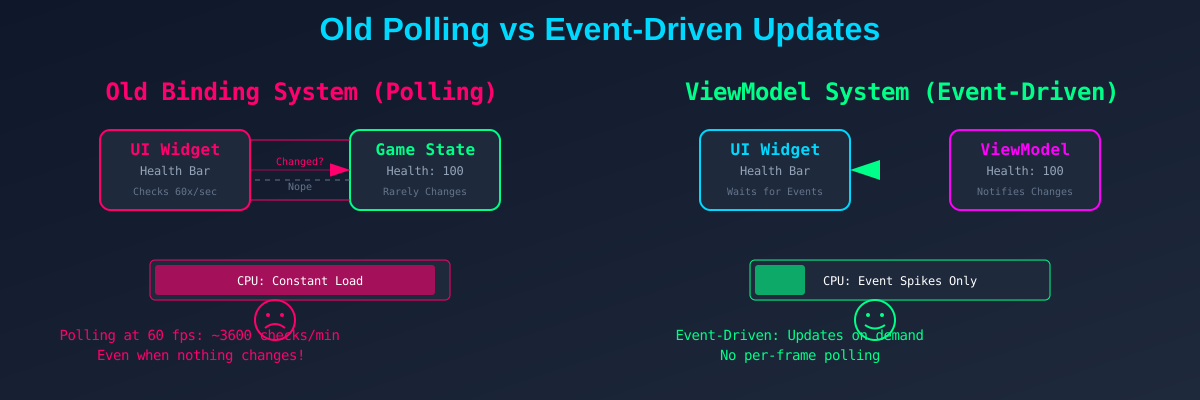
The old binding system is like a security guard who checks every door every second. The ViewModel pattern is like smart locks that notify security only when someone tries to enter.
Common pitfalls and how to avoid them
1. Forgetting to broadcast changes
In C++, you must call UE_MVVM_BROADCAST_FIELD_VALUE_CHANGED yourself, for every computed getter that depends on the value. Forget one, and that part of your UI won't update.
2. Circular dependencies
Don't write FieldNotify functions that depend on each other in a circle. You'll create an infinite loop of notifications.
3. Over-engineering
Not everything needs a ViewModel. Simple, static UI elements can still use direct property access.
Advanced patterns
Taking inspiration from GameplayFramework, our open-source Unreal plugin, you can create ViewModels that bridge complex game systems with UI:
// Example: weapon system ViewModel
UCLASS()
class UWeaponViewModel : public UMVVMViewModelBase
{
    GENERATED_BODY()

private:
    UPROPERTY(BlueprintReadWrite, FieldNotify, Setter, Getter, meta=(AllowPrivateAccess))
    FString WeaponName;

    UPROPERTY(BlueprintReadWrite, FieldNotify, Setter, Getter, meta=(AllowPrivateAccess))
    int32 CurrentAmmo;

    UPROPERTY(BlueprintReadWrite, FieldNotify, Setter, Getter, meta=(AllowPrivateAccess))
    int32 MaxAmmo;

    UPROPERTY(BlueprintReadWrite, FieldNotify, Setter, Getter, meta=(AllowPrivateAccess))
    bool bIsReloading;

public:
    UFUNCTION(BlueprintPure, FieldNotify)
    float GetAmmoPercent() const
    {
        return MaxAmmo > 0 ? (float)CurrentAmmo / (float)MaxAmmo : 0.0f;
    }

    UFUNCTION(BlueprintPure, FieldNotify)
    FString GetAmmoDisplay() const
    {
        if (bIsReloading) return "RELOADING...";
        return FString::Printf(TEXT("%d / %d"), CurrentAmmo, MaxAmmo);
    }
};
This pattern keeps your game logic separate from UI concerns while giving designers a clean interface. The same rule applies here: the setters for CurrentAmmo, MaxAmmo, and bIsReloading must broadcast the getters that read them.
Conclusion: let the UI react
The ViewModel plugin turns Unreal's UI from a needy, polling-based system into an event-driven one. Implement your ViewModels in C++, broadcast every dependent getter, and avoid Blueprint subclassing, and you'll build UIs that are fast, maintainable, and a pleasure to work with.
Remember: your UI should react to changes, not keep asking whether anything changed. Let's leave the polling in the past where it belongs.
Further reading
- Epic's official ViewModel documentation
- MVVM pattern in Unreal Engine
- GameplayFramework on GitHub, with open-source examples, and our case study on it
Next steps
Ready to use ViewModels in your project? Start small:
- Create a simple ViewModel for player health
- Bind it to a health bar
- Profile it against a traditional binding
- Never look back
Happy coding, and may your frame rates be high and your UI updates rare.
Get in touch
Building something like this?
Tell us what you are working on. You get a draft brief to review before anything is sent.